
Why it happens
It doesn’t take malice. Some leavers wipe a Mac to remove personal photos and passwords, and years of company work go with them. Others know exactly what they are doing.
Either way, the result for your business is the same unless a second copy exists somewhere the leaver cannot reach.
Not a repair shop that waits for something to break
Most computer repair shops meet you after the damage is done. We run a Mac data recovery lab, so we see what a wiped Mac costs a business, and we know which cases cannot be recovered. That is why this service starts before anyone leaves.
| A typical repair job | Offboarding protection | |
|---|---|---|
| Starts | After data has been lost | Before anyone hands in their notice |
| Covers | The one Mac on the bench | Every company Mac, wherever it is used |
| Relies on | Whatever is left on the drive | A backup the leaver cannot reach |
| Ends | When the Mac is handed back | It carries on. Backups are monitored and every leaver follows the same process. |
If the worst has already happened, the same lab does the recovery. See what to do now.
Why an unmanaged Mac puts you at risk
- The employee is the administrator, so they can erase the whole Mac in minutes.
- The only copy of their work often lives on that Mac, or in their personal iCloud.
- The Mac is encrypted with a password only they know.
- It may be locked to their personal Apple Account, which can leave you unable to reuse it.
- Recent Macs erase securely. Once a Mac has been fully erased, the data usually cannot be recovered from it, even by a specialist.
What we put in place
- Your company owns every Mac on record. Each Mac is registered to your Apple Business account and enrols into management automatically. The employee cannot remove it.
- Every Mac is managed with Jamf. We apply security settings, install the right apps, hold the encryption recovery key and can lock a Mac remotely.
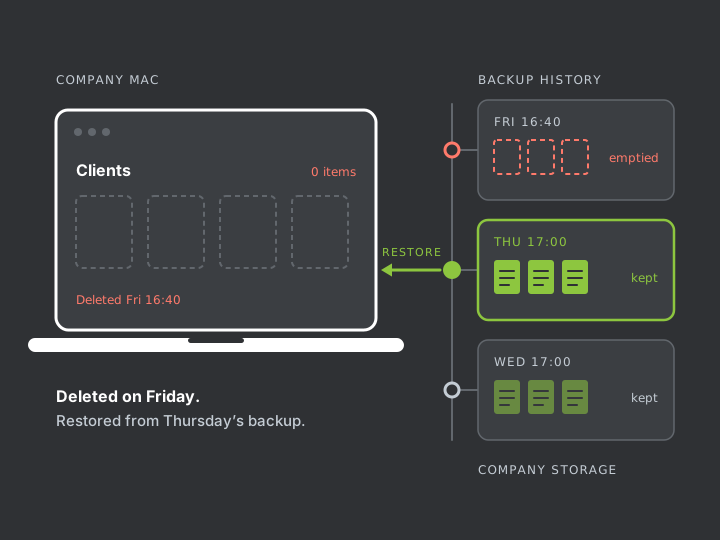
- Every Mac is backed up to storage you control. The backup runs in the background and keeps earlier versions and deleted files. The employee cannot switch it off or delete its history.
What that means on the day someone leaves
- You can have the Mac locked remotely the moment you decide.
- Files deleted last week are still in the backup, ready to restore.
- You can unlock the Mac without the leaver’s password, because you hold the recovery key.
- The Mac can be erased and handed to the next person without anyone’s personal login.
What it costs
You pay a monthly price per Mac and a one-off setup fee. You get a fixed quote before anything is set up.
Price calculator
Enter the number of company Macs to see our standard price range.
Offboarding protection for 5 Macs
One-off setup: £265 – £300. Where you fall in the monthly range depends on how much data each Mac holds.
| Service | What it covers | Price |
|---|---|---|
| Offboarding protection | Jamf management, the FileVault recovery key held for your company, monitored backup and the leaver process. | £15–£30per Mac per month + VAT |
| Setup | Apple Business account, enrolment of each Mac, the first full backup, a restore test and a staff device policy. | £53–£60per Mac, one-off + VAT |
Recovering data after a Mac has already been wiped is priced separately. See recovery prices.
Who this is for
This service is for businesses that run on Macs and have no IT department. If one person’s laptop holds work you could not afford to lose, it is for you.
We are based in Bermondsey, London SE1, and work with businesses across London. Management and backup both run over the internet, so we can also set up Macs remotely.
Has it already happened? Stop using the Mac. What you do in the next hour affects what can be recovered. Read what to do now.