

Can’t we just use Time Machine?
Time Machine is a good backup, but the drive sits on the employee’s desk. They can unplug it, erase it or take it home. A backup only protects you from a leaver if the leaver cannot reach it.
We use iCloud, Google Drive or Dropbox. Isn’t that a backup?
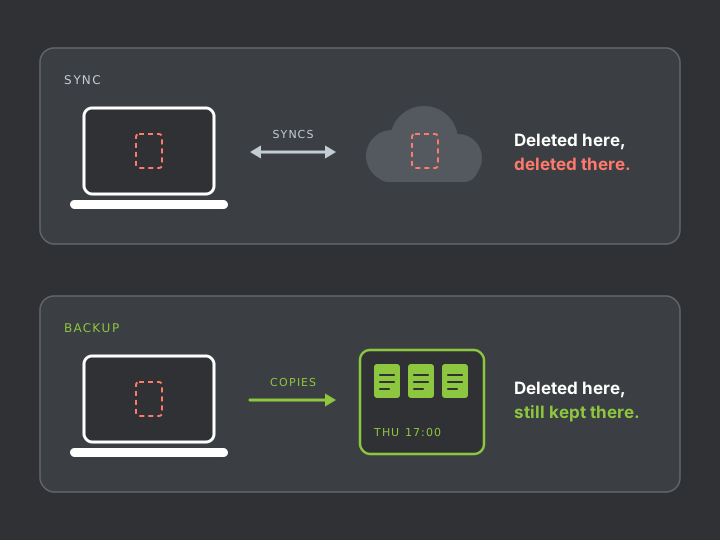
Those services sync, which is different. When a file is deleted on the Mac, the deletion syncs too. Their deleted-items areas help for a limited time, and only if someone notices soon enough.
Does Jamf back up our Macs?
No. Jamf manages and secures the Mac. We install separate backup software and use Jamf to keep it running.
Apple now includes free device management. Why use Jamf?
Apple Business includes built-in management that covers the basics. Jamf goes further on security settings, software deployment and reporting, which this service relies on. If Apple’s own tools are enough for your setup, we will say so.
Can an employee remove the management from their Mac?
Not on a Mac enrolled through your Apple Business account. If they erase the Mac, it enrols again during setup.
Can you see what our staff are doing?
We see the Mac’s settings, installed apps and security status. We do not read messages or watch screens. The backup contains whatever is saved in the folders it covers.
What about staff who use their own Macs?
Full protection is for company-owned Macs. We do not take control of a personal Mac. For personal devices, we keep work inside company cloud accounts and back those up instead.
We only have two or three Macs. Is this worth doing?
Yes. In a small business, one laptop often holds the only copy of the accounts, the client list or a year of project work.
How long are backups kept?
You choose. It should cover a notice period, plus the weeks it can take to spot that something is missing.
Does the Mac need to come into your lab?
No. Management and backup both work over the internet, so remote and home-based staff are covered.
What does it cost?
Between £15 and £30 per Mac per month plus VAT, depending on how much data each Mac holds, and a one-off setup fee of £53 to £60 per Mac plus VAT. Use the price calculator for an estimate, or contact us for a fixed quote.
Something has already been wiped. Can you help?
Yes. Stop using the Mac and read what to do now, or call 020 7394 2525.