
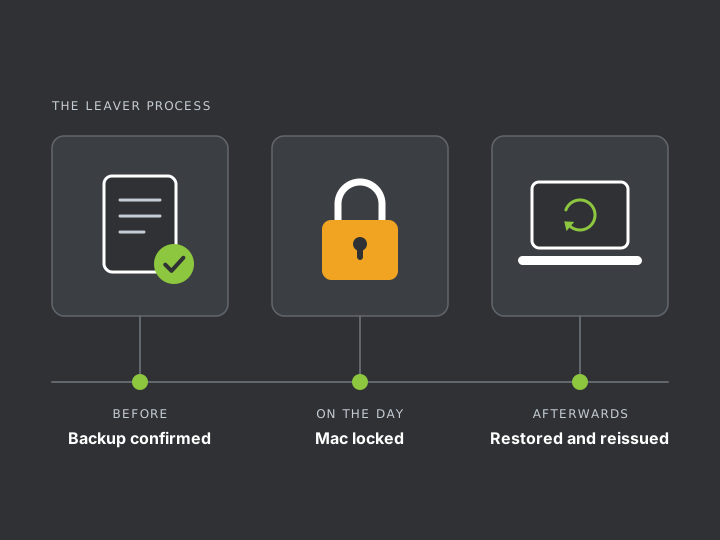
Before the leaving date
- You tell us who is leaving and when. For a dismissal, call us before the meeting.
- We confirm the last good backup of their Mac and check it covers their work folders.
- We hold their backup history so nothing ages out while the handover is in progress.
On the day
- Company accounts are secured. Email, cloud storage and other logins are suspended or have their passwords changed.
- The Mac is locked remotely if you need it. It shows a lock screen until a code we hold is entered.
- The Mac is returned to you or sent back to us.
Afterwards
- We compare the Mac with the backup and restore anything that has gone missing.
- Their work is handed over to a manager or to the person taking on the role.
- A final copy is kept for as long as your policy says, then deleted.
- The Mac is erased and reissued. It enrols into management again on first start.
When someone is working their notice
The Mac stays in use and the backup keeps running. Anything deleted during the notice period stays in the backup history.
If you have concerns about a leaver, tell us early. We can check the backup more often without changing anything they see.
Being fair to your staff
Protection works best when it is no secret. We recommend telling every employee, in writing, on day one:
- the Mac is company property and is managed by the company
- work files on it are backed up to company storage
- personal files should not be kept on it
- what the company can and cannot see
Management shows us the Mac’s settings, installed apps and security status. The backup holds whatever is saved in the folders it covers, which is why personal files belong elsewhere.
Rules on employee privacy and monitoring vary by country. Have your policy checked by someone qualified where you operate.